CircuitVerse Mobile App Enhancement | GSoC 2026
Hello everyone 👋
A few months ago I was refreshing the GSoC results page at 11:30 PM, waiting to find out whether years of attempts, rejections, late-night contributions and an unhealthy number of pull requests had finally paid off.
Today I’m writing my final Google Summer of Code 2026 report.
So I guess it did.
Somewhere between those two moments I upgraded a rather unhappy Flutter build, rewrote the Interactive Book, built a JSON API, embedded a Vue simulator inside a Flutter application, fixed the CI pipelines, joined the Dart Vaders for the CircuitVerse Mergathon, and spent an impressive amount of time asking the classic developer question: “But why does it work on my machine?"
Before getting into all of that, a little about me.
About Me
I’m Santam Roy Choudhury (SantamRC on GitHub), a software engineer from India and a 2023 graduate of NIT Durgapur. I currently work full-time as a Software Engineer at Publicis Sapient.
I have been fascinated by electronics for as long as I can remember. Circuit boards, Arduino projects, sensors, and the interaction between hardware and software are the things that got me interested in engineering in the first place. Over time that curiosity pulled me towards software development, and particularly towards mobile development.
What I love about mobile is that it never feels completely separated from the physical world. Through code you get to talk to cameras, GPS, gyroscopes, microphones, Bluetooth devices and countless other pieces of hardware sitting inside or around the phone. So when I found a GSoC project that combined Flutter, mobile development, digital circuits and open source, CircuitVerse felt almost suspiciously well matched to my interests.
There was another reason GSoC meant a lot to me: this was not my first attempt. I applied twice during college and was rejected both times, so trying again in 2026, this time alongside a full-time job, was meant to be one final serious attempt. That meant evenings after office spent working through issues, understanding the CircuitVerse codebase, opening pull requests, talking with the community, and eventually putting a proposal together. By the time applications closed I had made more than 15 contributions to the Flutter project, and a few of those proposal nights ran until 4 AM with office again the next morning.
Would I recommend that sleep schedule? Absolutely not. Was seeing my name on the list of selected contributors worth it? Absolutely.
The Project
This summer I worked with CircuitVerse on the Mobile App Enhancement project, under the mentorship of Yashvant Singh and Hardik Sachdeva.
The goal was not simply to add a few new screens. It was to take a Flutter app that had drifted a few years behind its ecosystem and turn it into something that builds reliably, ships reliably, and finally does justice to the two features that matter most on a phone: the Interactive Book and the circuit simulator. Alongside those came a lot of work on build tooling, CI/CD, search, onboarding, UI, caching and application architecture.
If you read my mid-term report, the first half was mostly foundation: dependency upgrades, build toolchain, repository hygiene, and the first cut of the Interactive Book rewrite. The second half is where the features landed: a server-driven Interactive Book with offline reading and progress tracking, a JSON API generated from the book’s own source, an embedded Vue simulator that runs without a network, and a CI/CD pipeline that no longer merges broken code into master.
And, as is usually the case in software engineering, getting there involved considerably more than the original task list suggested. This post walks through all of it.
How It Started
Before writing my proposal I spent a lot of time inside the CircuitVerse mobile codebase. I started small: understanding the project setup, reading existing code, fixing issues, opening pull requests, and learning how the maintainers reviewed contributions. Looking back, that was probably the best preparation I could have done. By the time I submitted the proposal I was not proposing changes to a repository I had only browsed on GitHub. I had already broken things, fixed things, received reviews, and disagreed with my own code from three days earlier.
Then came the interview. I was extremely nervous going into it and had prepared for all kinds of technical questions. Instead, the conversation with my mentors turned out to be friendly and genuinely enjoyable. We discussed my proposal, my implementation ideas, the contributions I had already made, and where we wanted to take the mobile application.
When the results were announced, I had been selected for Project 5: Flutter App, with Yashvant Singh and Hardik Sachdeva as my mentors. Yashvant had been in exactly my position a year earlier, as the GSoC 2025 contributor on the Flutter Upgrade project, so he knew both the codebase and the contributor experience extremely well. Hardik brought a wider understanding of the CircuitVerse platform and community. Between them, our regular discussions became the backbone of my GSoC journey.
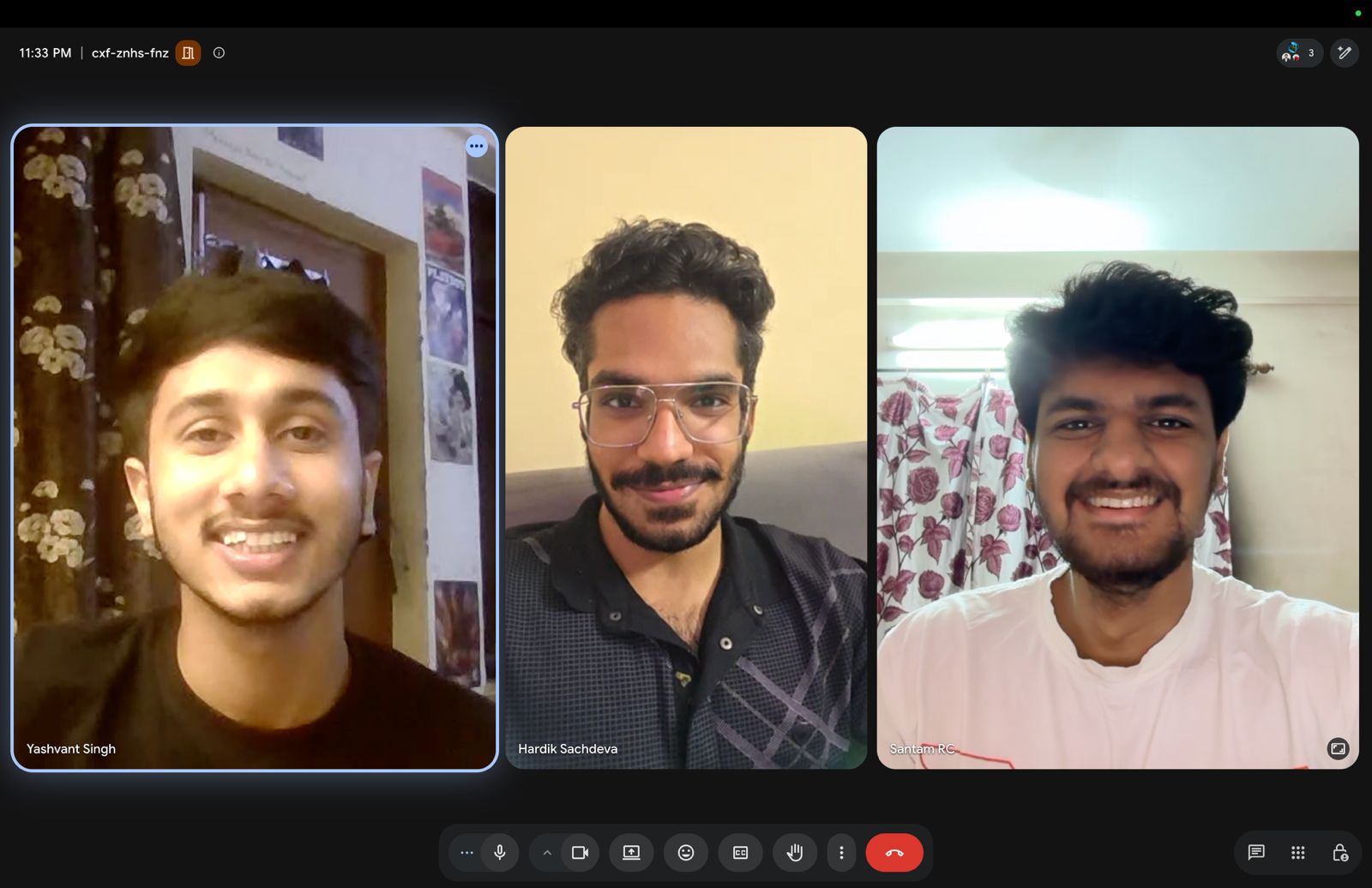
Community bonding began with introductions, a conversation about expectations, and planning the roadmap. Then came the glamorous first task of every ambitious software project: fix the build. I spent the beginning of the coding period upgrading dependencies and getting the project onto a stable, modern Flutter toolchain. It was not the flashiest way to start GSoC, but everything I built afterwards depended on it.
The Shape of the Project
The app is a Flutter client for circuitverse.org: projects, groups, assignments, notifications, a simulator, and the Interactive Book, an interactive digital-logic textbook. Three things were true when I started:
- The build was fragile. Android SDK, Gradle, AGP and Kotlin had all drifted; generated files were committed; CI was one 353-line workflow.
- The Interactive Book was a markdown parser in a trench coat. It fetched raw kramdown from the Jekyll website, ran it through
flutter_markdownwith 8 custom syntaxes and 8 custom builders, and fetched interactive components as raw HTML+JS from GitHub at runtime to stuff into a WebView. - The simulator was network-only. No connection, no simulator, on a platform where users are most likely to be offline.
Each of those became a workstream.
Part 1: Foundation
Before any feature work could be trusted, the build had to be trustworthy.
#530: Upgrading Deprecated Dependency Versions (Android) (merged) Migrated the Android toolchain to a modern baseline: SDK 35 → 36, Gradle 8.10.2 → 8.14, AGP 8.7.0 → 8.11.1, Kotlin 1.9.25 → 2.2.20. Not a version bump so much as an ordering problem: each upgrade constrains the others, so it took working through the compatibility matrix to find a combination that actually resolved.
#593: chore: upgraded dependencies (merged) The Flutter-side pass: minimum iOS deployment target to 13.0, CI toolchain to the latest stable, a dropdown initialisation bug fixed across the assignments, projects and notifications forms, and the in-app showcase flow simplified.
#578 and #619 (both merged) Removed Flutter-generated plugin registration files from version control and extended the ignore rules across Android, iOS and web build artefacts. These regenerate on every build; tracking them produces diff noise and cross-machine conflicts for no benefit.
#636: Fix black screen issue (merged)
A one-line fix with a satisfying blast radius: a recent commit had left Navigator.pop called twice, so screens like Contribute and About opened to a black screen. One deleted line, several screens back.
Part 2: Interactive Book V2
This was the centre of the project, and the largest single piece of work: #624: Interactive Book V2 (+5,203 / −4,552 across 122 files).
What was wrong with V1
The old path looked like this:
learn.circuitverse.org/_api/pages/
        ▼
  IbApi (HTTP)  →  IbEngineService  →  IbPageViewModel  →  IbPageView
                   (parses raw markdown + HTML)
                        ▼
                  MarkdownBody (flutter_markdown)
                        ├── Math          → flutter_math_fork
                        ├── <iframe>      → WebView
                        └── {% include %} → fetch HTML+JS from GitHub → WebView
Opening one page could trigger three network requests, two of them to GitHub for files that were then concatenated into a string and handed to a WebView. Content was untyped, and everything was a string until it wasn’t. Adding a new kind of content block meant adding a custom markdown syntax and a custom builder, then hoping the parser agreed with you.
The V2 architecture
V2 inverts the relationship: the server describes the page, the app renders it. This is server-driven UI, and for a textbook it’s close to ideal, because content changes far more often than the app ships.
Book API
  ▼
{ name, views: [...] }
  ▼
ViewModel.fromJson   →  one typed model per block
  ▼
Renderer             →  one Flutter widget per model
Adding a new content block is now: one model, one widget, one switch case. Navigation, caching and progress code stay untouched. Unknown type / sub_type values from the backend are logged and skipped rather than crashing the page, so new content types can ship server-side ahead of app support, which matters when app updates go through store review.
The whole feature lives in one self-contained folder, lib/features/interactive-book/, split into models/, services/ and ui/, 50 Dart files you can read, test or delete in one place.
Home screen
Three pieces, built to orient a reader who has never opened the book:
- Hero banner: a gradient header that doubles as the primary CTA. On a first visit it says Get Started; once anything has been read it shows overall progress (
x of y topics) and offers to resume at the first unread topic instead of restarting. - Features grid: Learn / Experiment / Practice / Master cards summarising what the book offers.
- Getting Started: a three-step walkthrough: choose a chapter, learn the concepts, practise.
Drawer
The drawer fetches the chapter tree from the API and renders it as an expandable tree, but it also carries the reader’s state:
- Chapter tree: chapters expand into sub-chapters; the open page is highlighted, visited topics are marked completed, the active topic is marked in progress.
- Progress card: overall completion across the book, with a shortcut to the next unread topic.
- Offline card: downloads the entire book, shows live download progress and cached size (
1.4 MB), and clears the cache. - Header and nav tiles: Home, About, Guidelines, and an exit back to the main app.
The renderer and content widgets
Renderer fetches a page, walks its views, and builds one widget per block, plus Back/Forward controls that walk the chapter → sub-chapter sequence in order and hide themselves at the two ends of the book.
| Widget | What it does |
|---|---|
TextWidget | Markdown text blocks with heading sizes |
TocWidget | Table of contents that scrolls to the section in-page via anchor keys |
ChapterContentsWidget | Links out to other chapters and sub-chapters |
BulletPointsWidget / NumberPointsWidget | List blocks |
CustomTable | Data tables, e.g. truth tables |
ClipboardWidget | Monospace code/output block |
ImageWidget | Embedded circuit simulations in a WebView |
PopQuizWidget | Inline multiple-choice questions with instant feedback |
The interactive simulators
These are the parts I enjoyed most, because they replace a WebView-with-JavaScript with native Flutter that actually feels like part of the app:
- Binary Simulator: toggle 8 bits, watch the decimal value update live from place values.
- Bitwise Operators: two 8-bit inputs, pick AND / OR / XOR, see the bitwise result and its decimal value.
- Switch & Light: flip two switches through AND, OR, NOT, XOR, NAND, NOR and XNOR and watch the bulb respond. (NOT correctly renders a single switch, a small detail that took a specific fix.)
- Character Representation: type characters, see their 8-bit binary encodings.
All four ship with @Preview annotations for Flutter widget previews, and all are responsive down to small screens. The seven logic-gate SVGs (AND, OR, NOT, NAND, NOR, XOR, XNOR) are bundled as assets rather than fetched.
Services, caching and progress
| Service | Responsibility |
|---|---|
IbApi | Single source of truth for the book base URL and endpoints, with dev and prod constants |
NavbarService | Fetches the chapter tree, falling back to cache |
BookChaptersService | Fetches chapter pages and About/Guidelines; all return the same { name, views } shape, so the renderer needs no special casing |
OfflineLibrary | Bulk-downloads every page into a Hive box, tracks progress, measures and formats cache size, clears it |
BookProgress | Persists visited topics in Hive, computes per-chapter and overall completion, resolves the next unread topic |
Caching is network-first, cache-fallback. Every successful response is written back to Hive, so downloaded content stays fresh and a failed request silently serves the last good copy. Cache read/write failures are swallowed rather than allowed to break a request that could still succeed.
Progress has rules. A topic counts as completed once opened; the current topic is reported separately as in progress. Chapter intro pages (sub_chapter_id == 0) are navigation landings, not topics, so they’re excluded from every count, which keeps a chapter’s percentage consistent with the rows shown under it in the drawer. Small thing, but a progress bar that disagrees with the list next to it reads as a bug.
Notably: no new dependencies. hive, http, flutter_svg, flutter_markdown and webview_flutter were already there.
Before and after
The same book, on the same device (an Android emulator, Pixel 10 Pro, 1280×2856), with master on the left and the V2 branch on the right. Both columns show the real book: V1 against a local Jekyll build of the pre-migration content, V2 against the live API.
Producing the left-hand column took some doing, because V1 does not run today. Its _api/ endpoints have returned 404 since the API was replaced, so against production it hangs on a spinner and then throws a RangeError on the empty page list. Behind that, two flutter_markdown bugs killed every chapter page before it painted: none of V1’s nine custom builders overrode isBlockElement(), so block tags were treated as inline and dereferenced a null root tag; fixing that exposed a second failure where those same tags left an empty inline behind. A third bug, BlockParser.current changing from String to Line in markdown 7.x, had been rendering every pop quiz blank. The screenshots below are master plus a 51-line diagnostic patch that fixes those three, kept with the screenshots but deliberately applied to no branch. (The dead backend is not something a patch can fix; that column runs against the local Jekyll build.) flutter_markdown is discontinued, so those bugs would have returned on any future Flutter upgrade, which is its own argument for the rewrite.
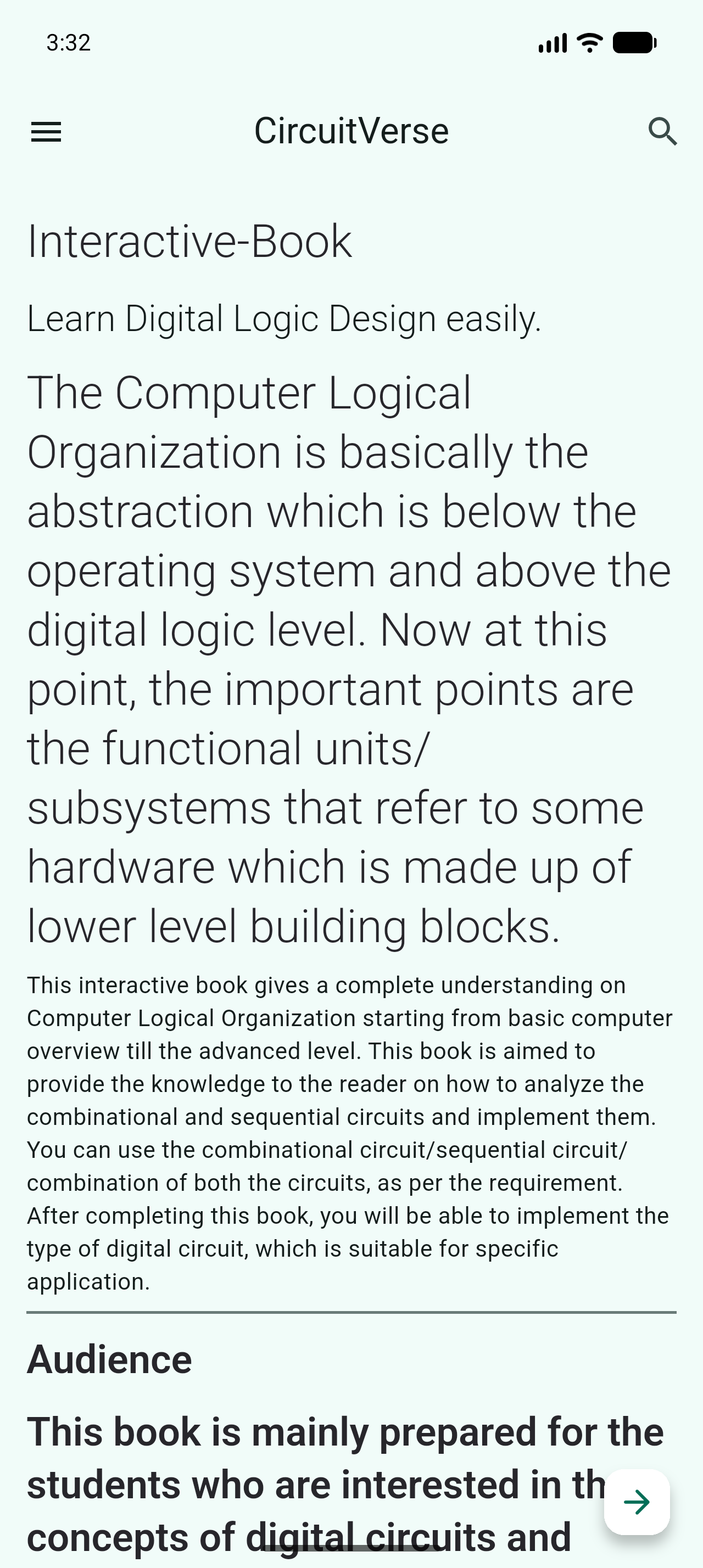
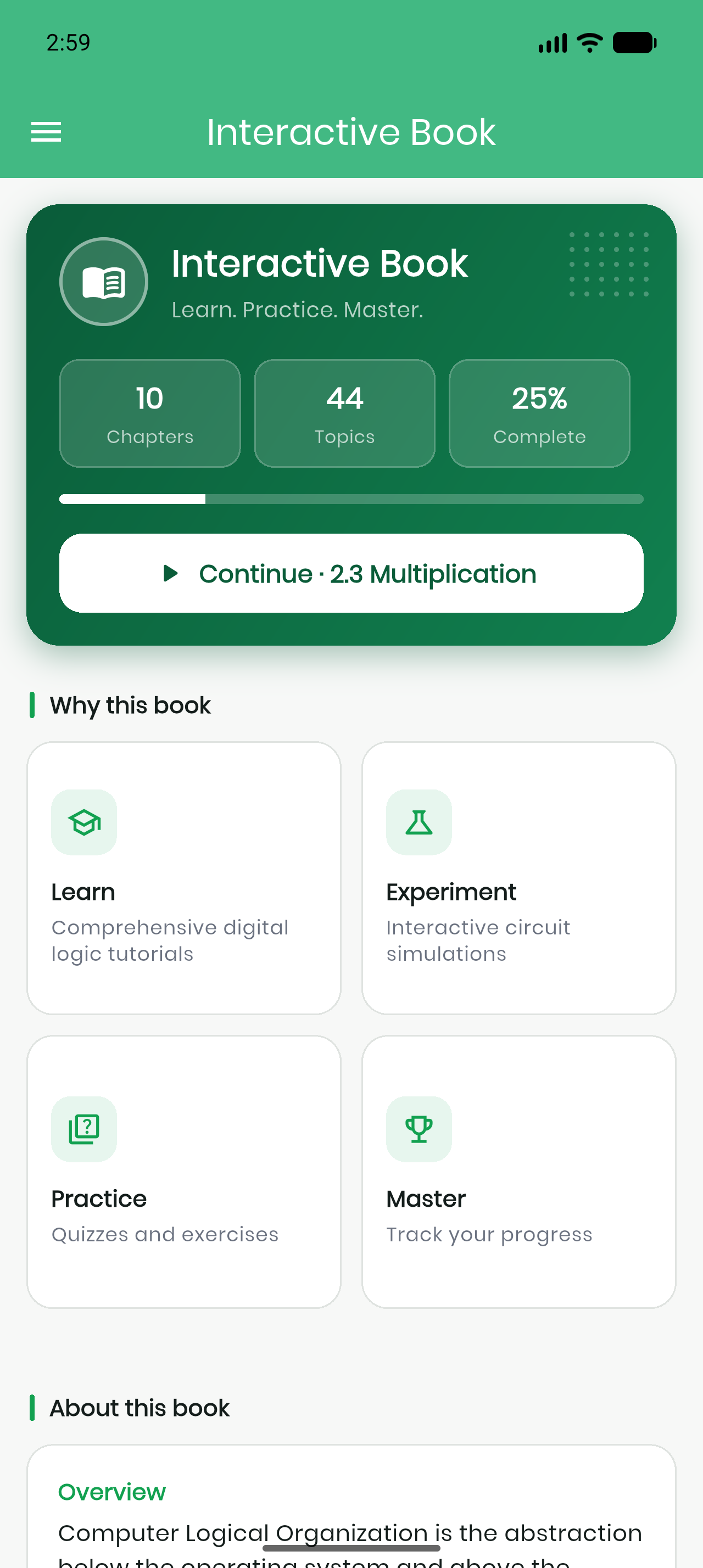
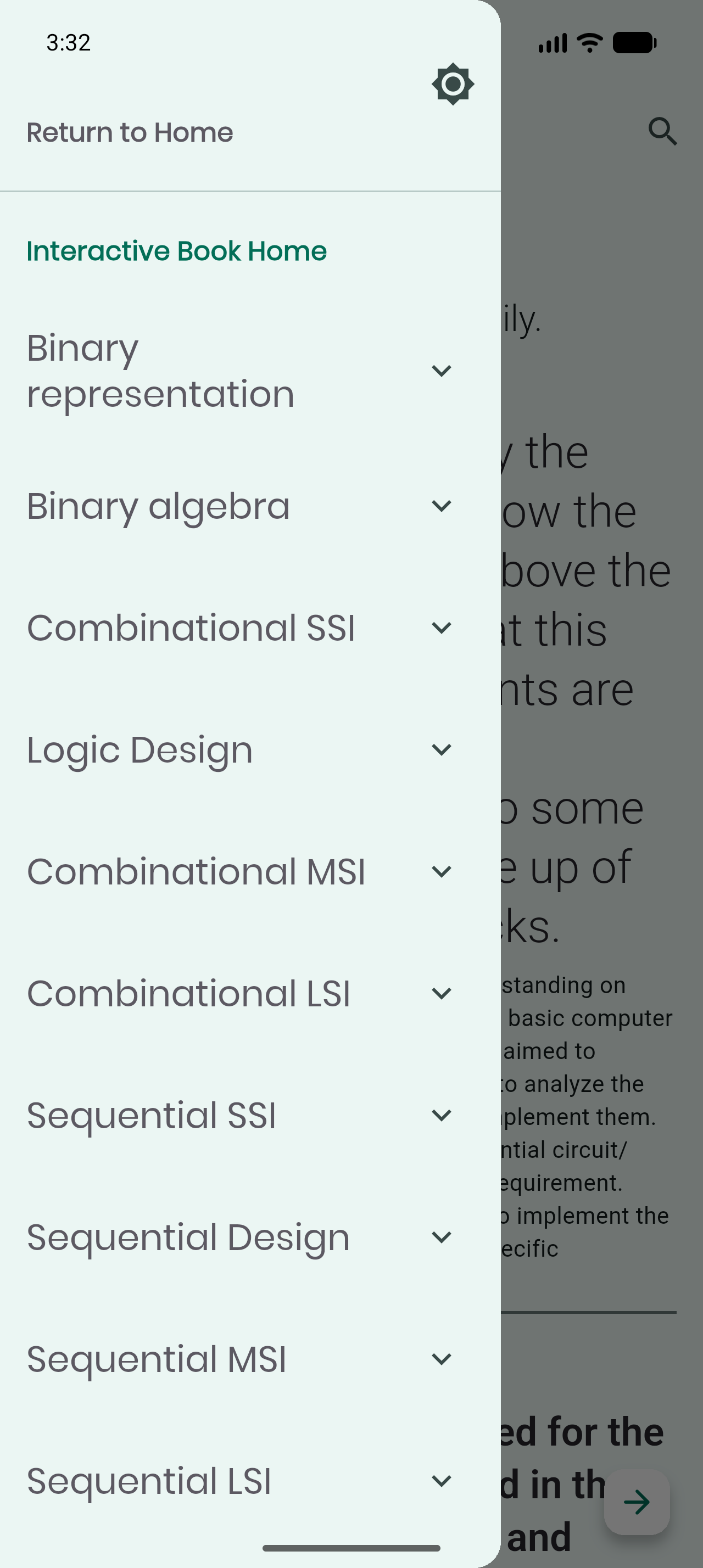
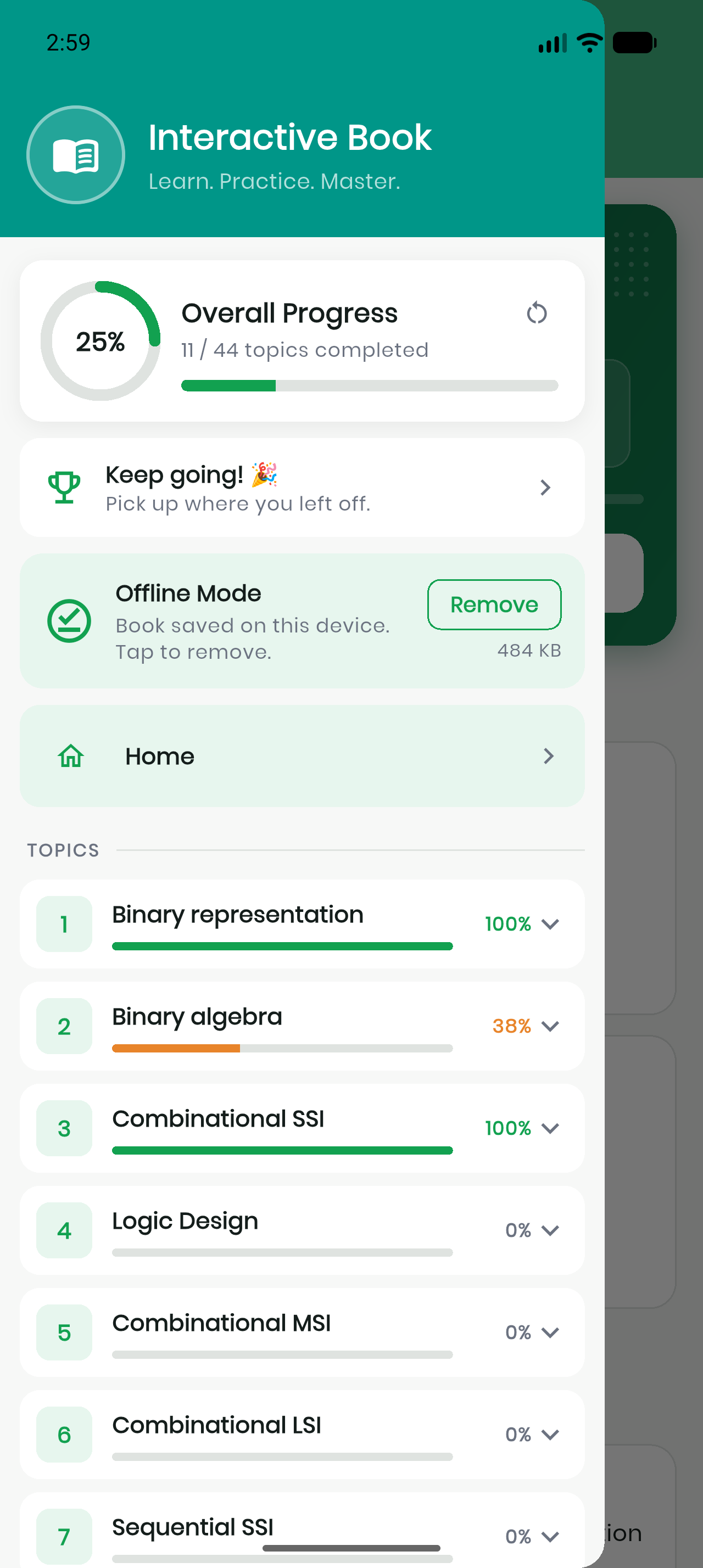
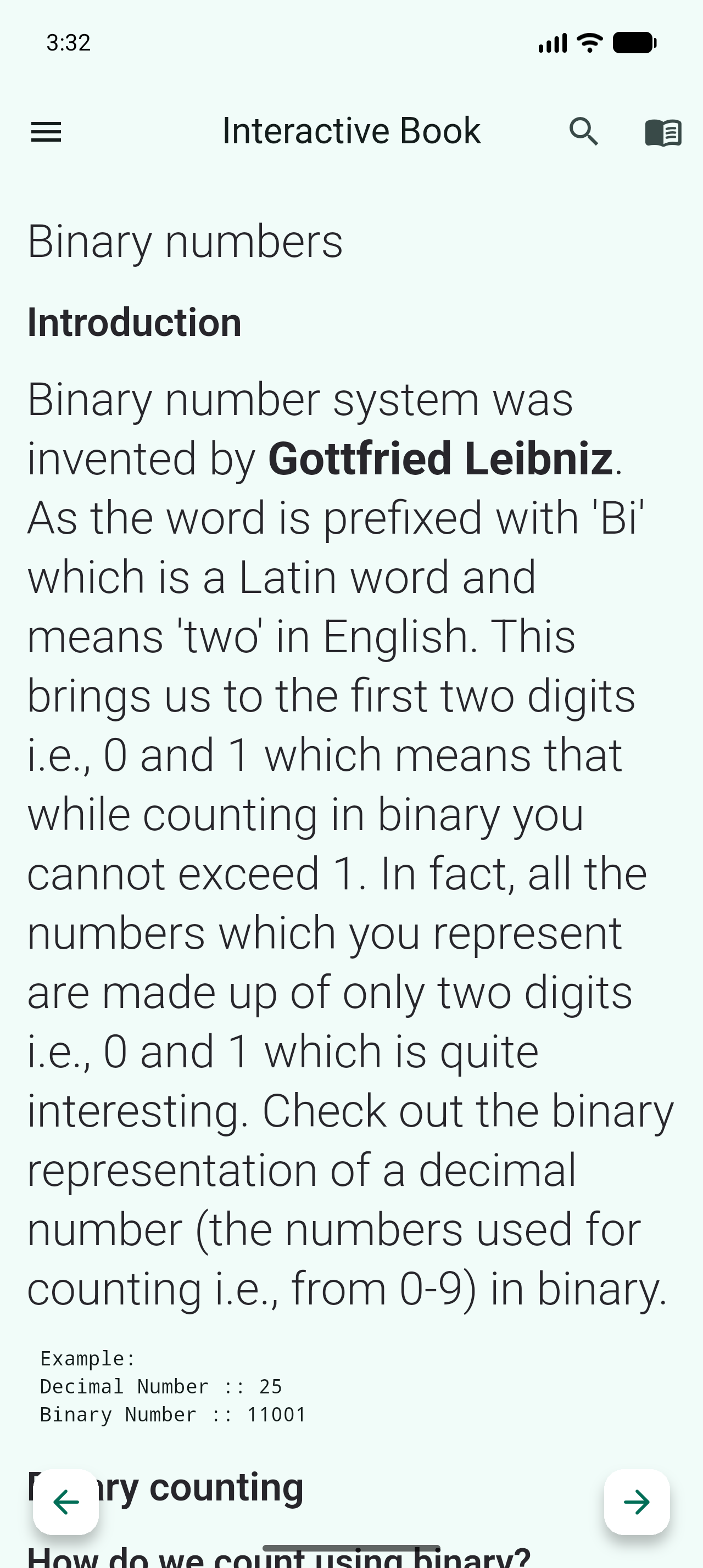
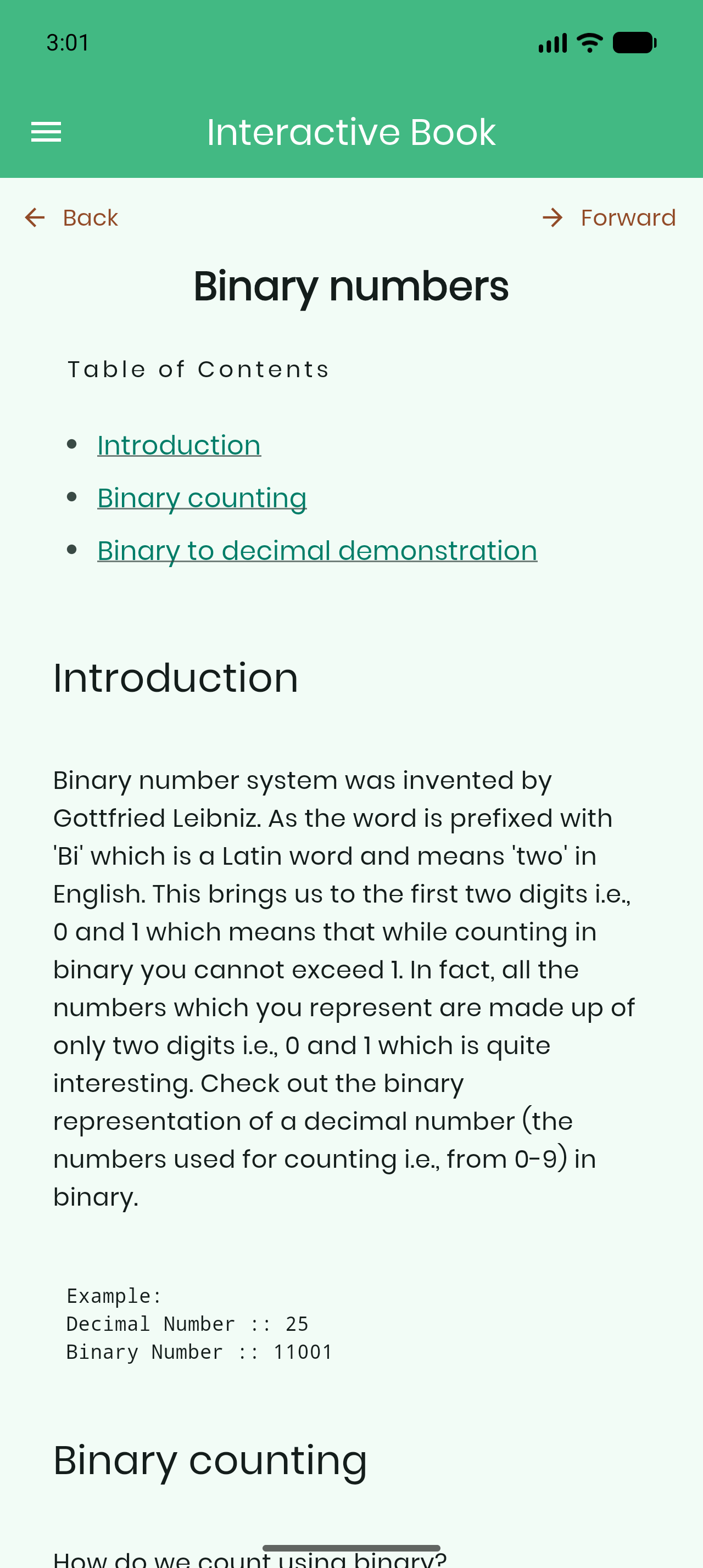
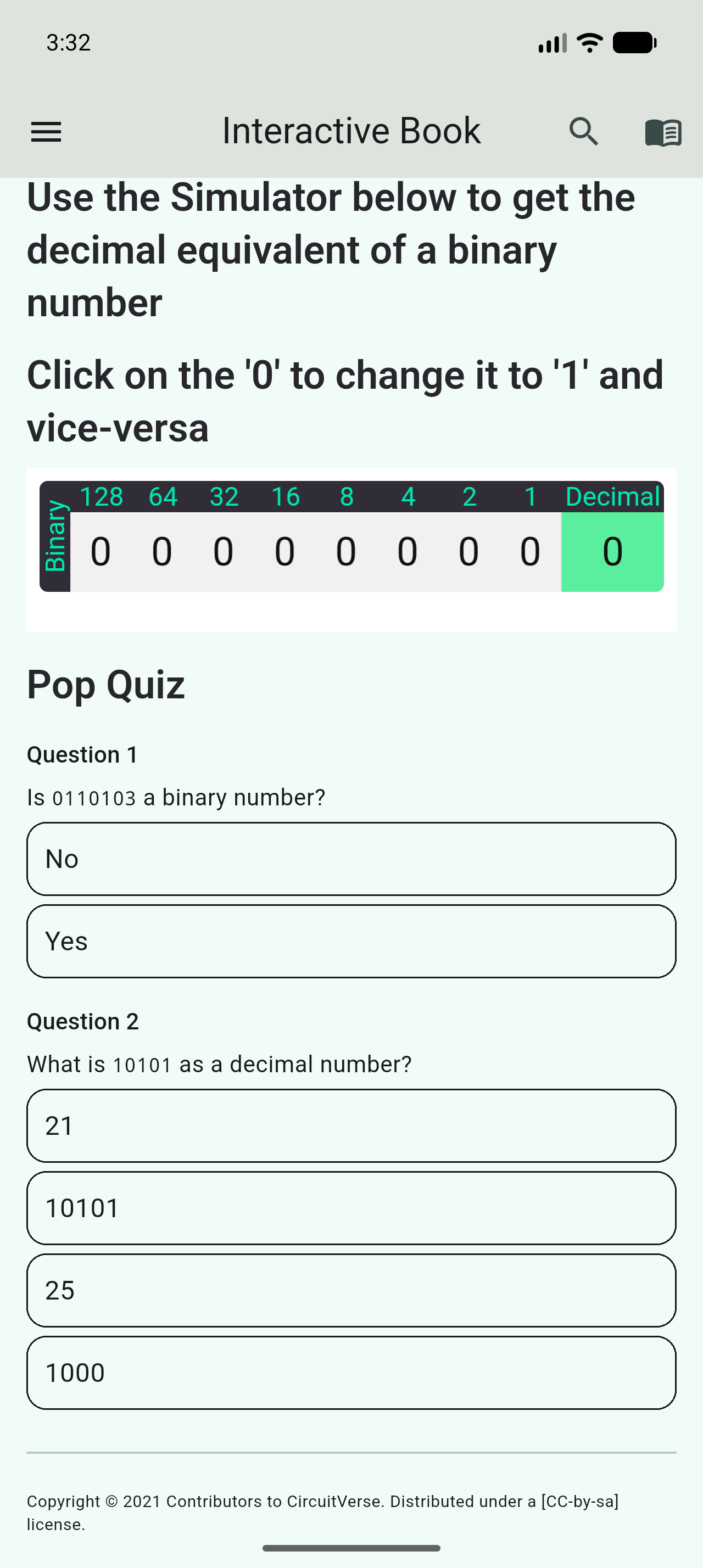
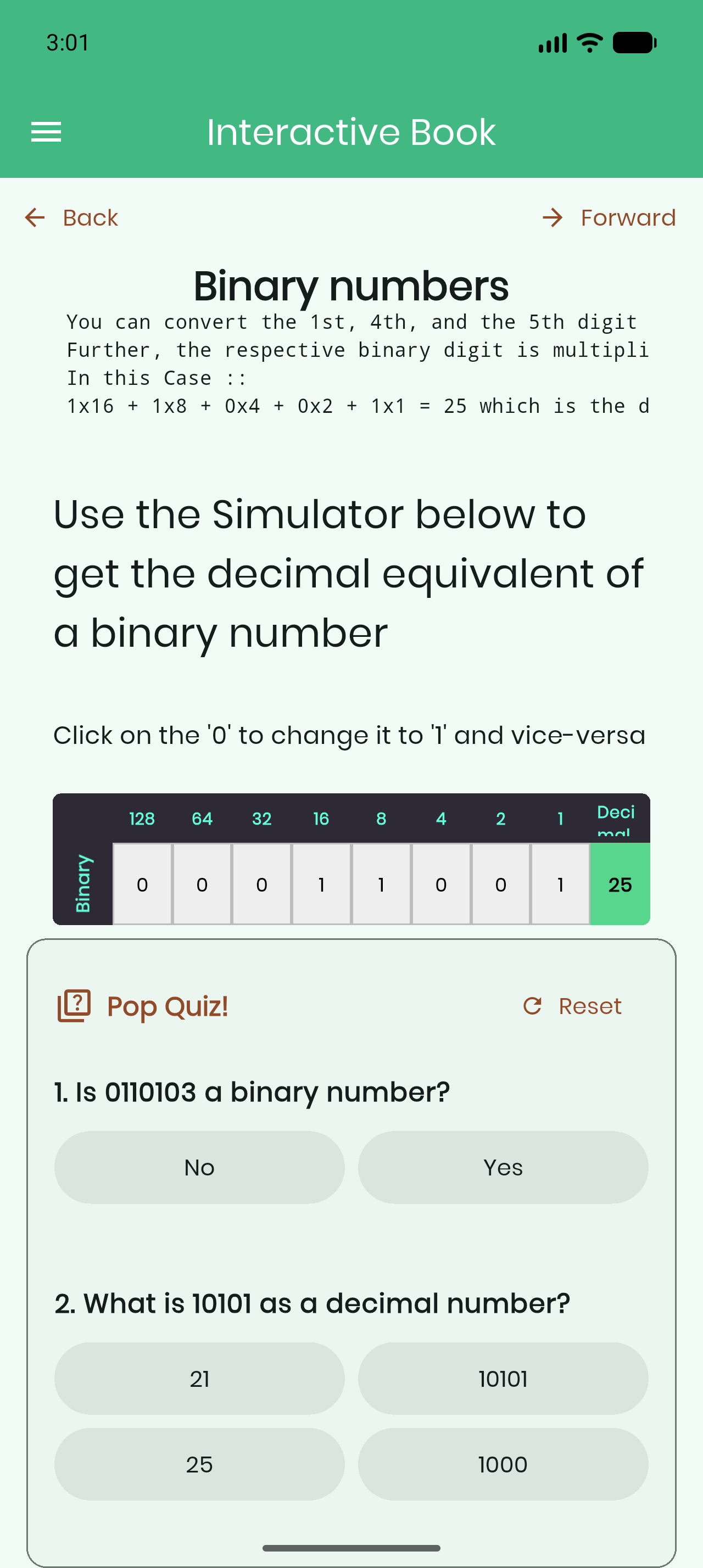
One asymmetry worth stating plainly: V1 has in-page search and V2 does not yet. Everything else on this list moved the other way.
Retiring V1
I deliberately shipped V2 alongside V1 first, so the two could be compared side by side before anything was deleted. Once V2 was signed off, the follow-up commits on the branch removed the old path properly: the v1 interactive book deleted and the app routed to v2, the IB base URL read from environment config, chapter pages addressed by slug to match the deployed API, and then the cleanup: dependencies only v1 used dropped, localisation strings only v1 used removed, the IB theme moved into the feature folder, asset globs trimmed, and tests added covering the interactive book endpoint and navbar slug parsing.
This PR has been through 30 rounds of review. A lot of what’s described above (the slug addressing, the scroll-controller disposal, the naming of the services, the NOT-gate rendering, the row-length normalisation in tables) exists in its current form because of that review.
Part 3: The Other Half of the Book: a JSON API
A server-driven client needs a server that drives it. The Interactive Book is a Jekyll site, and its old _api/ endpoint returned Jekyll-rendered HTML strings, perfect for a WebView and useless for native rendering.
Interactive-Book #802: Flutter IB JSON API generator (merged), +1,118 / −101 across 15 files.
The book is authored once in docs/ as kramdown markdown and served two ways: Jekyll renders the website, and a new generator renders the same source into a flat view model the mobile client renders natively.
python3 utils/md2json
No flags, no arguments, no third-party dependencies. It reads docs/, rewrites the whole output tree, and prints warnings for anything it cannot translate.
Why replace rather than add
_api/ (removed) | api/ (added) | |
|---|---|---|
| Page content | Jekyll-rendered HTML string | structured views array |
| Includes | expanded to raw simulator HTML/JS | sub_type naming a native widget |
| Citations | resolved into HTML by jekyll-scholar | [n] markers plus a reference list |
| Lists, tables, quizzes | HTML <ol>, <table> | typed widget payloads |
| Requires | jekyll-admin plus a running server | nothing; reads docs/ directly |
Serving both would mean maintaining two representations of every page forever. And removing _api simplified the deploy considerably: generating it meant booting a detached Jekyll server, crawling it over HTTP with an unqualified sudo python, then pkill-ing the server. The deploy is now: build, generate, deploy.
The published API:
GET {base}/api/navbar.json                    chapters, each with its path
GET {base}/api/{path}/0.json                  chapter index
GET {base}/api/{path}/{sub-chapter id}.json   one section
GET {base}/api/about.json
GET {base}/api/guidelines.json
57 documents in all (10 chapter indexes, 44 sections, plus navbar, about and guidelines), published to GitHub Pages by the existing deploy job, alongside the site. The navbar is self-describing, so remote clients don’t need to hardcode the book’s structure.
This work started as a proof of concept back in March (Interactive-Book #766) and took until September to land in a form I was happy with, mostly because the first version added an API and the final one replaced one, which is a much better outcome and a much harder review.
Part 4: The Embedded Vue Simulator
#646: Embedded Vue Simulator, +1,129 across 16 files.
The goal: run the real CircuitVerse Vue simulator (cv-frontend-vue: Vue 3, Vuetify, jQuery UI, HTML5 canvas) inside the app, without a network connection, and have it behave like a native screen.
cv-frontend-vue            git submodule at ./vue
        │  tool/build_vue_simulator.dart
        ▼
vite build (VITE_BASE=/)   vue/dist/simulatorvue/v0/
        │  delete yosys.* (~47 MB Verilog WASM), vendor jQuery, patch index.html
        ▼
same directory             declared in pubspec.yaml, ~7.4 MB
        │  rootBundle
        ▼
VueSimulatorServer         http://localhost:<port>/ (assets + /api/v1 proxy)
        ▼
InAppWebView               VueSimulatorView
Why a server at all
This is the interesting bit. The obvious approach, loadFlutterAsset, gives the page a file:// null origin, which blocks ES modules, web workers and fetch. The bundle needs all three.
So the app runs a loopback HTTP server on an OS-assigned port and serves the bundle from rootBundle. That also solves a second problem for free: the CircuitVerse API can be proxied through the same origin, with the app’s session token injected server-side.
GET /simulator-v0.js   →  rootBundle.load('vue/dist/simulatorvue/v0/…')  →  200
GET /api/v1/me         →  https://circuitverse.org/api/v1/me
                          + Authorization: Token <LocalStorageService.token>
One origin means the Vue app issues relative URLs and cannot tell the two paths apart. No CORS cooperation is needed from circuitverse.org, and no JavaScript has to be injected into the page, which is the part I’m most pleased with, because injected bridges break every time the upstream bundle changes.
Navigation as a pure function
A web app inside a native shell will try to navigate to web routes. Every top-level navigation is classified before it’s allowed, by a pure function that’s unit-testable in isolation:
| Path | Destination |
|---|---|
/, /index.html, /api/… | stay in WebView |
/simulator/edit/:id | reopen project in place (inject id, reload) |
/users/:id | native ProfileView |
/users/:id/groups | native MyGroupsView |
/users/sign_in | native LoginView |
/users/:id/projects/:pid | native ProjectDetailsView |
| anything else on the origin | pop back to the app |
| off-origin | refused; stays in the simulator |
The view runs chrome-free: landscape-locked, immersiveSticky, no SafeArea, no in-view back control, so the canvas gets the whole display, with everything restored in onModelDestroy.
Being honest about the rough edge
The build output isn’t committed, and pubspec.yaml bundles it directly. I verified what happens when the directory is absent: flutter build apk --debug prints Error: unable to find directory entry in pubspec.yaml, then exits 0 and produces an APK containing zero simulator files. So CI stays green while shipping a build where the feature is silently broken, which is worse than a hard failure, because nothing draws attention to it. That’s documented in docs/vue-simulator.md along with the fix (a Node setup + vite build step in CI), and it’s the first thing I’d want addressed before this ships to users.
Part 5: Home Screen
#641: Improve homescreen UI, +225 / −146.
The home screen was carrying buttons that led nowhere useful and missing the things a newcomer actually wants. Removed the Teachers and Contributors buttons and Explore Circuits; added a Tutorials and Contests row, a Growing Community section with live statistics (circuits, users, universities, countries), and reworked the features section with a testbench card.
A fuller redesign, still in review
The shipped changes were deliberately incremental, but the home screen is not the only screen that has aged. Alongside the code I put together a complete UI redesign in Figma, covering the navbars, home, explore, contests, about, profile and settings screens. The goal was to keep CircuitVerse’s existing colour theme and design language so that the new screens would read as a natural extension of the app rather than a different product.
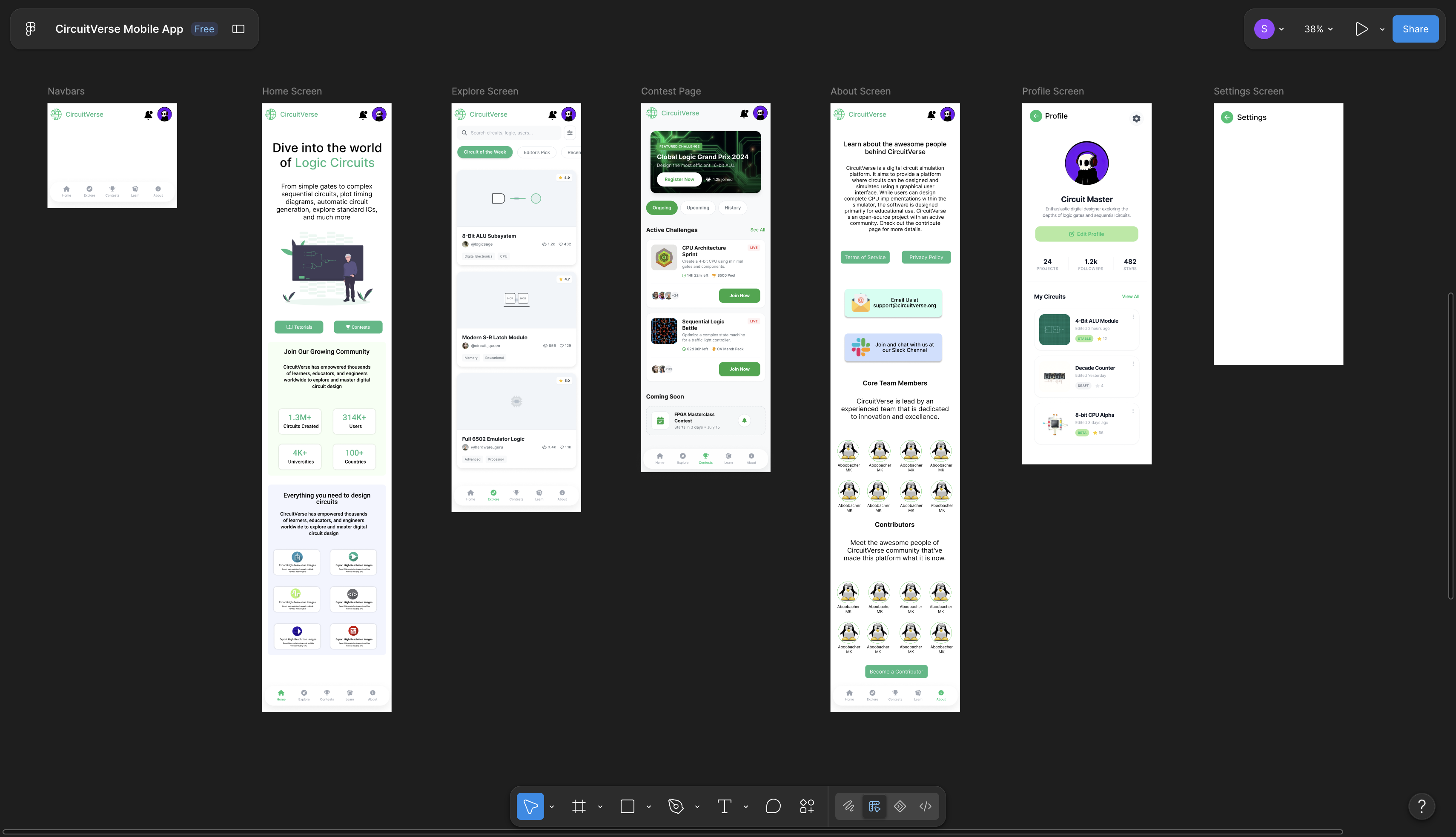
A change of this size needs sign-off before it turns into code, and that review is still in progress, so the redesign has not landed. It is queued as future work, and it is the starting point for the UI item further down this post. I wrote about how these designs came together, and why getting design approval up front saves rework later, in Week 3 of my weekly logs.
Part 6: CI/CD, and Stopping the Bleeding
#632: Improved Workflows, +528 / −498.
The 353-line monolithic ci.yml became focused workflows: android.yml, ios.yml, web.yml, plus test.yml, the shared Dart/Flutter suite extracted into a reusable workflow (workflow_call) that also runs standalone as a first-class check. deploy-preview.yml folded into web.yml so the Netlify preview lives next to the build producing it.
iOS and web builds are now gated on tests. The iOS gate matters commercially: macOS runners bill at 10× and there’s no reason to spend that on a red PR.
Then the correctness fixes, which are the ones I found interesting because each was a thing that had never worked:
mainanddevelopwere in trigger branch filters. Neither branch exists in this repo, so those filters were dead.- The Crowdin push trigger could never fire: it watched branch
main(repo ismaster) and pathlib/l10n/arb/app_en.arb(actual pathlib/l10n/app_en.arb). Only a 12-hourly cron was keeping translations moving at all. - CocoaPods install failures were being masked instead of failing the iOS job.
- Preview APK comments now update in place instead of posting a new comment per push.
And the release pipeline (cd.yml):
- Play Store deploys now run the test suite first: previously they shipped with zero tests run.
- A concurrency guard (
cancel-in-progress: false) so simultaneous release runs can’t race on tag creation and the version-bump push. versionCodederived from the semantic version rather thanGITHUB_RUN_NUMBER, which resets to 1 if the workflow is ever renamed, at which point Play rejects every subsequent upload permanently.- Signing secrets passed via
env:instead of interpolated into shell script text. - The inline
.releaserc.jsonheredoc extracted into a committed file, so it’s reviewable in diffs and can be dry-run locally. - Ruby 3.0 → 3.3 (3.0 is EOL).
The September fixes
In the final weeks, master broke, and how it broke turned out to be a process problem worth fixing at the root. Four PRs, each deliberately independent so they could be reviewed and merged separately:
#652: constrain intl and html
Two dependabot bumps each pinned a dependency the rest of the project couldn’t use. flutter_localizations ships from the Flutter SDK and pins intl to an exact version; #642 set pubspec.yaml to the equally exact intl: 0.20.3, making the two unsatisfiable, so flutter pub get failed outright. Then #650’s html 0.15.7 dropped a top-level matches, breaking compilation of 61 tests. Fixed with ranges so pub can settle on what the pinned SDK actually requires.
And a detail I only found by reading logs carefully: on the Windows job this failure was invisible. Get Dependencies is a multi-line PowerShell block, where only the last command’s exit code is checked, so the step reported success while flutter pub get had already failed.
#653: silence the MSVC coroutine error
Build Validation (windows-latest) had failed on every CI run since it was added: master pushes, dependabot PRs, feature branches alike. The runner image now ships Visual Studio 18 / MSVC 14.51, which promoted a <experimental/coroutine> deprecation from a warning to a hard static_assert error. C++/WinRT uses that header when compiled as C++17, and apply_standard_settings sets cxx_std_17, so two plugins pulling C++/WinRT in both failed. Two lines in windows/CMakeLists.txt.
#654: correct the Crowdin trigger and ARB paths
The follow-through on the dead trigger: crowdin.yml pointed at /lib/l10n/arb/, a directory that doesn’t exist. The ARB files live directly in lib/l10n/.
#655: require CI to pass before dependabot auto-merge
The root cause. The workflow called gh pr merge --auto, and GitHub’s auto-merge waits only for checks that branch protection marks as required, not “all checks”. So:
| PR | CI result | Merged? |
|---|---|---|
#640 oauth2_client 4.3.2 → 4.3.3 | failure | yes |
#642 intl 0.20.2 → 0.20.3 | broke flutter pub get for every job | yes |
#650 html 0.15.6 → 0.15.7 | broke 61 tests | yes |
That’s exactly how the breakages in #652 reached master. Fixing #652 fixes today; #655 is what stops it happening again.
Part 7: Documentation and the Road Ahead
Alongside the code I wrote design documents for the decisions that outlive any single PR:
docs/ib-migration.md: old vs new Interactive Book architecture, side by side, including exactly how content reached the screen in V1 and why the navigation model changed.docs/vue-simulator.mdanddocs/vue-simulator-architecture.md: the simulator as built, plus the reasoning, the failure modes and the known limitations. Written so the next person doesn’t have to rediscover why there’s an HTTP server in a mobile app.docs/feature-first-migration.md: a proposal for the structural change I’d most like to see next.
That last one deserves a paragraph. The codebase is organised layer-first: 166 Dart files grouped by technical role (ui/, viewmodels/, services/, models/), each then subdivided by feature. Touching one feature means editing files in four sibling top-level directories, and locator.dart imports every viewmodel in the app. Feature-first inverts it: group by feature, then by layer, with a core/ holding genuinely cross-feature code that features depend on and which never depends on them. The Interactive Book already lives this way in lib/features/interactive-book/, and the difference in navigability is stark. The document lays out the full target tree and a migration order.
Everything, In One Table
During the GSoC coding period
| PR | Repo | Title |
|---|---|---|
| #624 | mobile-app | Interactive Book V2 |
| #802 | Interactive-Book | Flutter IB JSON API generator |
| #646 | mobile-app | Embedded Vue Simulator |
| #641 | mobile-app | Improve homescreen UI |
| #632 | mobile-app | Improved Workflows |
| #636 | mobile-app | Fix black screen issue |
| #619 | mobile-app | Modified gitignores for modern Flutter builds |
| #652 | mobile-app | Constrain intl and html for the pinned Flutter SDK |
| #653 | mobile-app | Silence MSVC coroutine error breaking Windows build |
| #654 | mobile-app | Correct Crowdin trigger branch and ARB paths |
| #655 | mobile-app | Require CI to pass before dependabot auto-merge |
Roughly 8,200 lines added and 5,300 removed across 179 files, in two repositories.
Before the coding period
The proposal and community-bonding months were spent learning the codebase by contributing to it: dependency and toolchain work (#530, #593, #578, all merged) plus a set of exploratory PRs: a proof of concept for the Interactive Book rewrite (#514) and its API counterpart (Interactive-Book #766), native notifications and deep links, isolates for API calls, an improved drawer, splash and onboarding screens, Bengali localisation, and a testing pass. Those were closed as the project direction consolidated in June, but the two proofs of concept are the direct ancestors of #624 and #802, and I’d argue that’s the best thing an exploratory PR can grow up to be.
What I’d Do Next
Being straightforward about the state of things, since that’s more useful than a victory lap:
- Finish the Play Store deployment path. Wire Fastlane into CI so a release is one reproducible pipeline rather than a sequence of manual steps, and confirm the
versionCodescheme against the Play Console before the next upload, because Play permanently rejects a code lower than one already published. At1.2.3the new scheme yields1002003. - Improve the UI. #641 reworked the home screen and the Interactive Book was designed from scratch, but the older screens (projects, groups, assignments, notifications) still carry the app’s original look. Bringing them up to the same standard is the most visible improvement left, and the Figma redesign above is ready to build from once it clears review.
- Localise the drawer’s Interactive Book label: it’s currently a hardcoded string rather than an
AppLocalizationskey. - Begin the feature-first migration, one feature at a time, starting from the pattern the Interactive Book already establishes.
What I Learned
The best fix is often upstream of the bug. I could have fixed intl and moved on. Finding out why three broken dependency bumps got into master, auto-merge waiting only on required checks, was worth more than the three fixes combined.
Read the logs, not the status badge. A green Windows job that had actually failed flutter pub get, hidden by PowerShell exit-code semantics, is the kind of thing you only find by reading output nobody was reading.
Server-driven UI is a deployment decision, not an architecture fad. The reason the Interactive Book should render from JSON isn’t elegance; it’s that app updates go through store review and content doesn’t.
Review is where the work gets good. #624 went through 30 rounds. Roughly a third of what I described in Part 2 exists in its current shape because a reviewer pushed back. That was, genuinely, the most educational part of the summer.
Delete things. The most satisfying commits I wrote this summer removed the v1 interactive book, the dependencies only it used, the localisation strings only it used, and a whole HTML API. A rewrite isn’t finished until the thing it replaced is gone.
The Weekly Logs
I wrote up each week of the program as it happened. If you want the day-to-day version of this report, with the false starts still in it, they are all here:
- Getting Selected in Google Summer of Code ‘26
- Week 1: Get Set, Go!
- Week 2: Planning the Road Ahead
- Week 3: From Planning to Designing the Solution
- Week 4: Overcoming Roadblocks and Building Momentum
- Week 5: Diving into SDUI and the Interactive Book
- Week 6: Wrapping Up the Interactive Book and Looking Ahead
- Week 7: Wrapping Up Mid-Term with the CircuitVerse Mergathon
- Week 8: Search Was the Easy Part
- Week 9: A Better First Launch
- Week 10: Improving the CircuitVerse Home Screen
There is also my mid-term report on this blog, covering the first half.
Thanks
To Yashvant Singh and Hardik Sachdeva, for the design discussions, for the review comments that made me rewrite things I thought were already done, and for the patience during the stretch where the answer to every question was “it depends on how the backend shapes the JSON.” Somewhere in the middle of all that, the three of us also entered the CircuitVerse Mergathon together as the Dart Vaders, which tells you roughly how seriously we were taking the leaderboard.
To the wider CircuitVerse community, for reviewing pull requests from someone who was new in May and asking good questions about all of them.
CircuitVerse is a genuinely useful thing: free digital-logic education that works in a browser, for students who might not have a lab. Getting to make the mobile side of that work better (offline, on a phone, in a classroom with bad wifi) has been a good way to spend a summer.
The work continues; the PRs are open and I’m not going anywhere.
Thanks for reading.
Santam Roy Choudhury GitHub